Website template · Food & drink
Burger joint website template
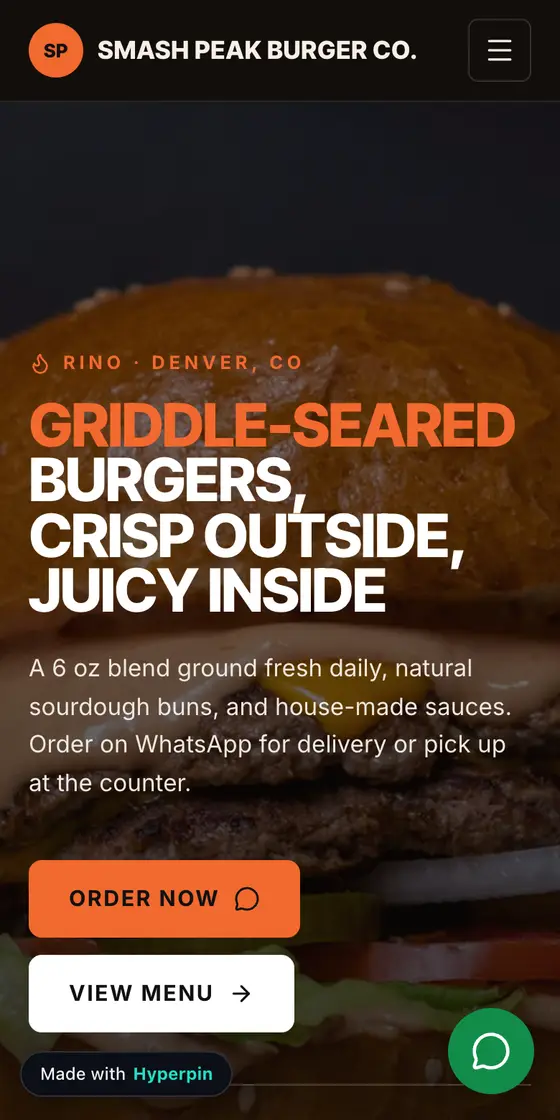
A complete website for burger joints, with 8 sections, copy that speaks the niche's language and a "Order now" button that goes straight to WhatsApp. Generate it in about 1 minute on Hyperpin and sell it to the businesses in your city that still have no website.
Hyperpin is a platform for people who build and sell websites to local businesses: it finds businesses without a website on the map, generates the site with AI and helps close the sale.
Example with a fictitious business. ·
Why burger joints need a website
A burger joint without a website is at the mercy of delivery apps and Instagram to get found. A hungry customer searches for burgers nearby and wants to see the actual burger, a menu with prices, whether the place delivers to his area and whether he can pick up at the counter. A site with a readable menu and an order button that opens a message lets regulars order directly, without the commission DoorDash or Uber Eats takes on every ticket.
What customers want to know before choosing
- The full menu with prices, including combos, patty options and add-ons.
- Whether the place delivers to his neighborhood or is pickup only.
- Real photos of the burgers, to judge size and how the patty is cooked.
- Opening hours, especially late nights and weekends.
What's in the burger joint template
The sections come in this order, designed for people searching on their phone. You can reorder, hide or edit any of them.
Every button on the site opens the business's WhatsApp with a prefilled message.
Services the template already knows how to highlight- Delivery
- Pickup
- Combo meals
- Craft burgers
- Vegan options
- Drinks & sides
- Card & mobile pay
- Air-conditioned dining room
- 01
Opening
The business promise, neighborhood and city, with the “Order now” button right away.
- 02
Menu
The menu organized by category, with prices.
- 03
Highlights
What makes customers pick this business over the competition.
- 04
Gallery
Photos of the place and the work, which is what convinces most people searching on a phone.
- 05
Testimonials
Customer reviews that build trust with people who don't know the business yet.
- 06
Location
Address, map and opening hours, for people looking for a burger joint nearby.
- 07
FAQ
The questions every customer asks before reaching out, already answered for this niche.
- 08
Final call to action
The final call, with the “Order now” button opening WhatsApp.
What to charge for a website for burger joints
Hyperpin's suggested reference for burger joints, for a one-page website. Use it as a starting point and adjust to your portfolio and your market.
| City size | Minimum | Suggested | Premium |
|---|---|---|---|
| Up to 100k people | $310 | $380 | $540 |
| 100k to 500k | $360 | $450 | $630 |
| 500k to 2 million | $410 | $520 | $720 |
| Over 2 million | $470 | $590 | $820 |
Suggested monthly maintenance: $29 (basic) or $52 (complete).
Reference values, not an official price list. Inside Hyperpin, pricing also considers the exact city, the number of pages and extras.
Work it out for your case in the free calculatorCommon mistakes on burger joint websites, and how the template avoids them
- Common mistake
Keeping the menu only inside DoorDash or Uber Eats, which pushes loyal customers to order through the app and pay its fees.
In the Hyperpin templateThe template has a menu section with items and prices, and the order button goes straight to the restaurant's WhatsApp.
- Common mistake
Posting the menu as an image on Instagram, where it does not show up in search and is hard to read on a phone.
In the Hyperpin templateOn the site the menu is real text, readable on mobile and indexable by Google, and it can be edited in the visual editor when an item changes.
- Common mistake
Not making clear whether the place offers delivery, pickup or dine-in, and getting orders from people too far away.
In the Hyperpin templateThe highlights and FAQ explain how the place serves customers, and the location section shows the map and hours.
What owners in this niche usually say, and how to answer
Ready answers to the niche's most common objections. In Hyperpin they come with the business name and city filled in.
Objection“I'm already on DoorDash.”
DoorDash brings in orders, but they take a cut of every one. On the site, the "Order now" button goes straight to texting Smash Peak Burger Co.—regulars can order directly, no app fees.
Objection“My menu changes all the time.”
No problem—the site's menu is editable. Weekly combo changes? We update it in minutes, no rebuild needed.
Objection“Burger joints sell through Instagram.”
Instagram shows off the burger; the site shows up when someone searches "burger place in your city" on Google and doesn't follow you yet. That's new people finding Smash Peak Burger Co.'s menu.
How to find burger joints without a website in your city
- 1
Search the niche and city
In Hyperpin, pick "burger joint" and your city. The search checks Google Maps for you.
- 2
See who has no website
The list is sorted by opportunity: no website, with a phone number and good reviews first.
- 3
Generate the site and reach out
Create the burger joint website in about 1 minute and send the WhatsApp message Hyperpin writes for you.
Questions about websites for burger joints
Does a burger joint on DoorDash or Uber Eats still need a website?
The apps bring new customers, but they take a commission on every order and keep the customer relationship. A website becomes the restaurant's own channel: someone who already loves the burger finds the menu and orders by message. Keeping both makes sense, using the apps to get discovered and the site for repeat orders.
How do you keep a burger joint's online menu up to date?
Burger places change combos, specials and prices often, so the menu has to be easy to edit. In the template each item is an editable field with name, description and price, changed in the visual editor without rebuilding the site. It helps to agree with the owner on who updates it whenever the menu changes.
How much does a website for burger joints cost?
Using Hyperpin's reference, a one-page website for burger joints in a city of 100k to 500k people ranges from $360 to $630, with $450 as the suggested price, plus $29 a month for basic maintenance. Bigger cities pay more.
What should a website for burger joints include?
Hyperpin's burger joint template has 8 sections: opening, menu, highlights, gallery, testimonials, location, faq, final call to action. The main button is "Order now" and it opens WhatsApp.
Other Food & drink templates
There are burger joints without a website near you right now
Create your free account, search your city and generate your first burger joint website today.
Create free account